
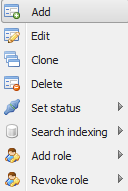
A right click context menu is available in overviews of GUI, theme, topic, background maps, users and roles.
| Name | Description |
|---|---|
| Add | Add a new element. |
| Edit | Edit chosen element. |
| Clone | Clone chosen element. |
| Delete | Delete chosen element. |
| Set status | Setting the status of the selected item (Online / Offline). Also described as “Active”. |
| Search indexing | This option is only applicable in the theme section. Re-indexes the Lucene index for the selected theme. Used in relation to the search topic. |
| Reset user password | This option is only applicable in the list of users. It resets the password for selected user, and sends this information to the user. |
| Add role | Adds a role to the current element. |
| Revoke role | Removes a role from the current element. |